


V14.0.39

- Package Name
- com.dv.adm
- Version Name
- V14.0.39
- Version Code
- V14.0.39
- File Size
- 20.38 MB
- Update time
- 2026-1-6



by admtorrent
ADM intercepts files from browsers and accelerates downloading by several times.
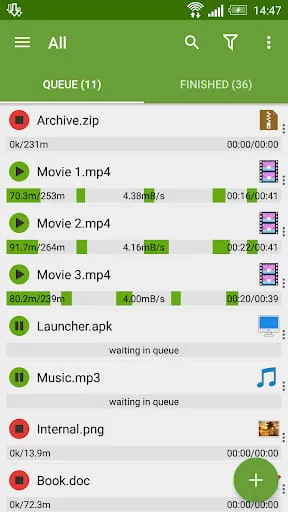
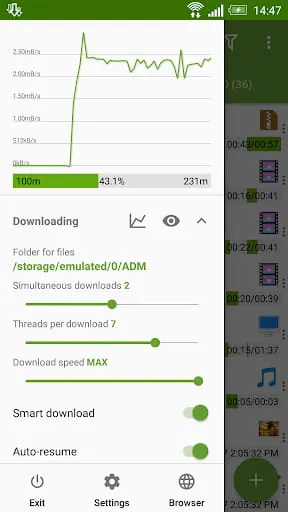
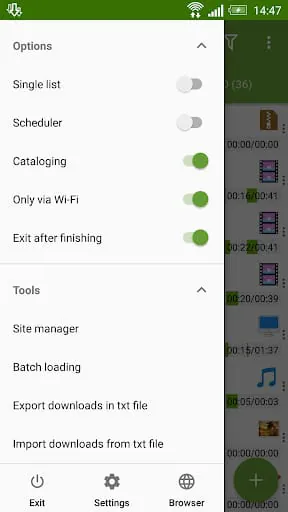
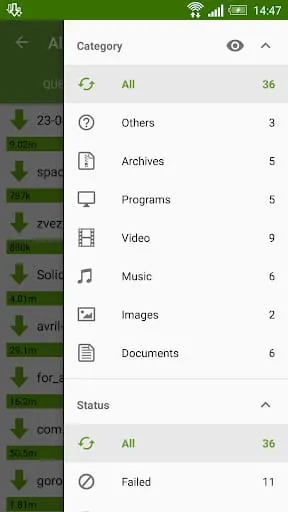
Advanced Download Manager, commonly abbreviated as ADM, is a powerful and versatile mobile application designed to significantly enhance and accelerate the downloading process on Android devices. It functions as a comprehensive replacement for a device's default downloader, allowing users to manage internet file retrieval with greater control, speed, and organization. Beyond simple downloads, it supports pausing and resuming transfers, downloading in the background, and fetching files from a wide array of online sources, including video platforms and cloud storage services, making it an essential tool for efficient digital content management.
The core appeal of Advanced Download Manager lies in its robust set of features engineered for performance and convenience. It excels at accelerating downloads by segmenting files into multiple parts and downloading them simultaneously, which can drastically reduce total download time. The application includes a reliable browser for directly navigating to and capturing download links. Furthermore, it boasts a built-in video finder that detects media streams on web pages for easy downloading. Its support for downloading via magnet links and torrents expands its functionality beyond typical direct downloads, while the scheduler feature allows users to plan downloads for specific times, optimizing bandwidth usage.
Like any software, Advanced Download Manager presents a mix of strengths and weaknesses that users should consider.
The application performs several critical functions that streamline the downloading experience. Primarily, it acts as a high-speed download engine, taking over all download tasks from the system. Its intelligent download logic includes error recovery and resume capability from supported servers. The app also functions as a download scheduler and queue manager, letting users prioritize, pause, or stop downloads as needed. Additionally, it serves as a simple media player and file explorer for accessing completed downloads. The ability to import download lists from browsers and the clipboard integration for detecting links are practical functions that save considerable time and effort.
Click the button "Check All Versions" below to download and install it. After installation, launch the app and grant the necessary storage permissions. To start a download, you can either paste a direct download link into the app's "Add URL" section, use the built-in browser to navigate to a file, or simply copy a link from your regular browser—ADM will typically catch it and prompt you to start the download. You can manage all active and queued downloads from the main "Downloading" tab, where you can pause, resume, or cancel tasks. Completed files are neatly categorized in the "Downloads" section by file type, such as videos, music, or archives. For optimal performance, explore the settings to customize the number of download threads, set bandwidth limits, and configure the download scheduler according to your preferences.
Get Advanced Download Manager from an official store or available APK channel.
ZIP files require a Split APKs Installer (e.g., SAI) from Google Play to install. Steps: 1. Download SAI from Google Play; 2. Open SAI and tap "Install APKs"; 3. Select the ZIP file; 4. Complete installation.
The latest version currently listed by Appspicked is V14.0.22, with information updated on May 18, 2026. Versions may vary by device, region, or rollout schedule, so users should also check Google Play or announcements from admtorrent.
No website can guarantee that an app is completely risk-free. Appspicked recommends downloading Advanced Download Manager only from an official app store or a verified channel operated by admtorrent. Before installing, confirm the developer name, package ID com.dv.adm, requested permissions, privacy policy, and download source.
Advanced Download Manager may be unavailable because of regional restrictions, device incompatibility, account or age settings, a temporary removal, a name change, or because it has not been released for that platform. An Android package page does not necessarily mean that an iOS App Store version exists. Check admtorrent’s official website for current availability.
Use Google Play or another official download channel provided by admtorrent whenever possible. Appspicked provides app information and store links, but users should verify the destination domain and publisher before downloading or updating the app.
The information on Appspicked may represent the most recently indexed snapshot. App stores sometimes release updates gradually or display different versions according to region, device, operating system, or testing group. The official store listing should be treated as the final reference.
Advanced Download Manager is listed for Android, with a reported minimum requirement of Not specified. Actual compatibility may also depend on the device model, region, available storage, hardware features, and installed system components.
The initial download may be free, but subscriptions, advertising, paid features, or in-app purchases may still apply. Prices and available purchases can vary by country and version. Check the payment information displayed by Google Play before completing a transaction.
Check the network connection, storage space, operating-system version, account region, and device compatibility. Restart the device and try again through the official store. If the problem continues, consult the support resources provided by admtorrent.









