Open Menu
Microsoft 365 Copilot
PRODUCTIVITY · ANDROID · IOS

Microsoft 365 Copilot

by Microsoft Corporation

Copilot, Word, Excel, and More
4.60 ★
(500+ reviews)
1B+
Downloads

A closer look

Microsoft 365 CopilotMicrosoft 365 CopilotMicrosoft 365 CopilotMicrosoft 365 Copilot
ADVERTISEMENT

Overview

Microsoft 365 Copilot is an AI-powered productivity assistant deeply integrated into the Microsoft 365 ecosystem, including Word, Excel, PowerPoint, Outlook, Teams, and OneNote. It leverages large language models (such as OpenAI's GPT-4) combined with the Microsoft Graph to understand your work context—such as your emails, calendar events, chats, and files—allowing it to provide grounded, personalized assistance right where you are already working, rather than requiring you to switch to a separate AI tool or browser tab.

Key Features

Microsoft 365 Copilot offers a wide array of intelligent features designed to streamline daily workflows across different applications:

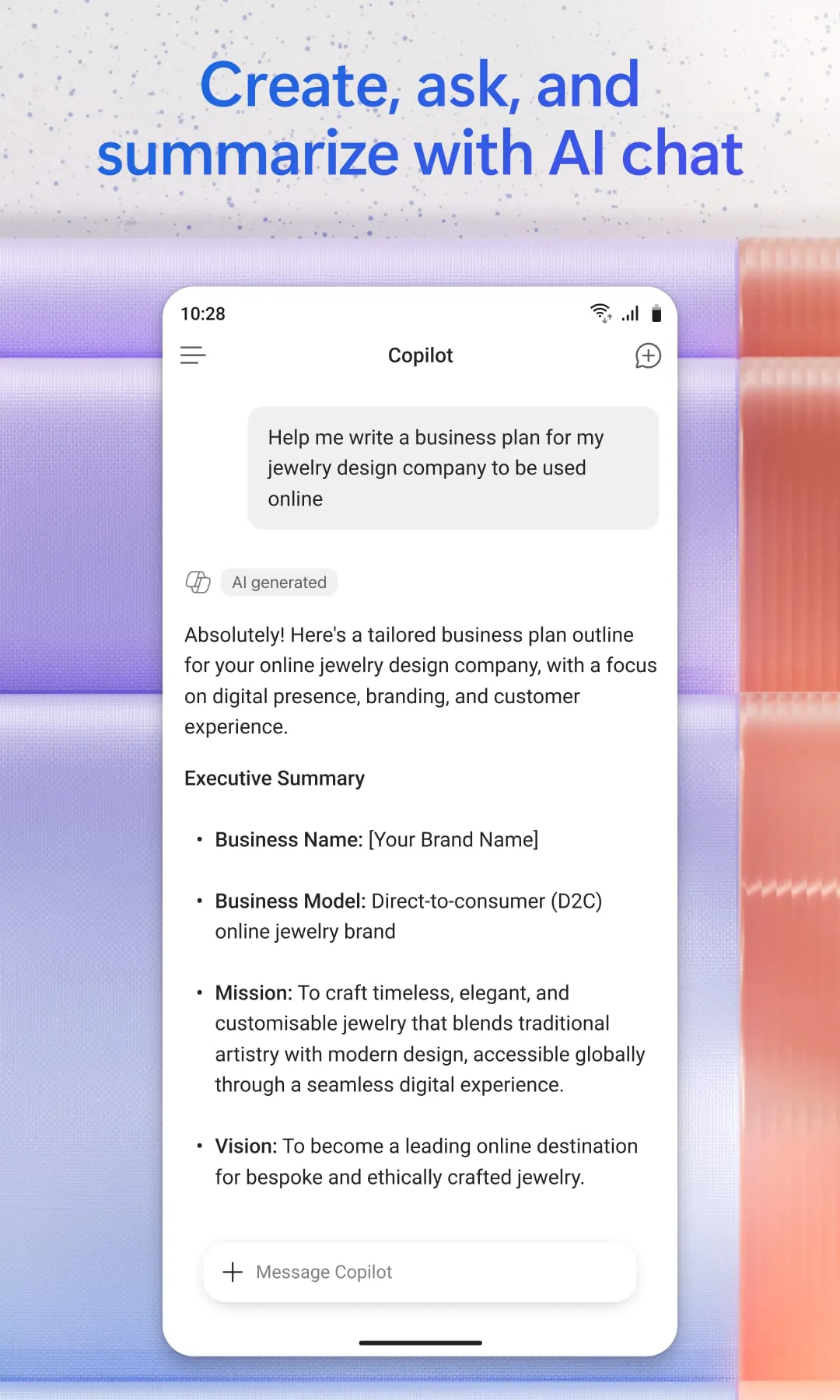
  • In Word, it helps draft new documents from scratch, summarize lengthy texts, rewrite content for clarity or tone, and answer questions about the document you are working on.
  • In Excel, you can ask questions about your data in plain language (e.g., "What were my top expenses last quarter?"), and it will suggest formulas, generate charts, identify trends, and provide data insights without needing to write complex functions manually.
  • In PowerPoint, it can create entire presentation decks from a simple outline or a Word document, add speaker notes, summarize slides, and apply organizational branding templates automatically.
  • In Outlook, it summarizes long and complex email threads into key points, drafts email replies in your professional voice, coaches you on clarity and tone before sending, and helps prioritize your inbox.
  • In Teams, it provides real-time meeting summarization, lists key decisions and action items after a call, allows you to ask questions about what was said during the meeting, and summarizes lengthy chat threads or channels.
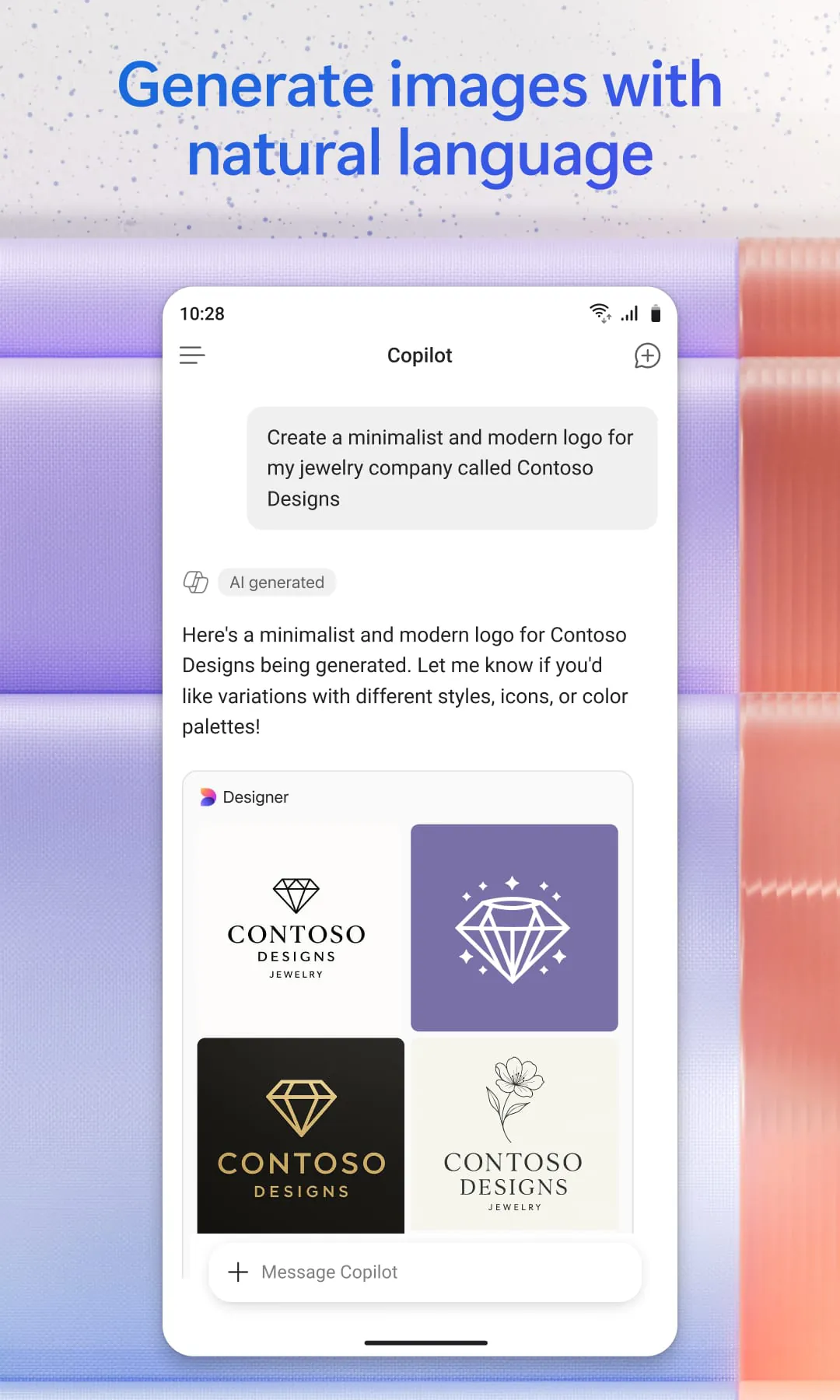
  • The standalone Microsoft 365 Copilot app (available on web, desktop, and mobile) provides a centralized place to chat with the AI, create and edit content, scan documents, manage projects via Copilot Notebooks, and build custom AI agents to automate repetitive workflows.
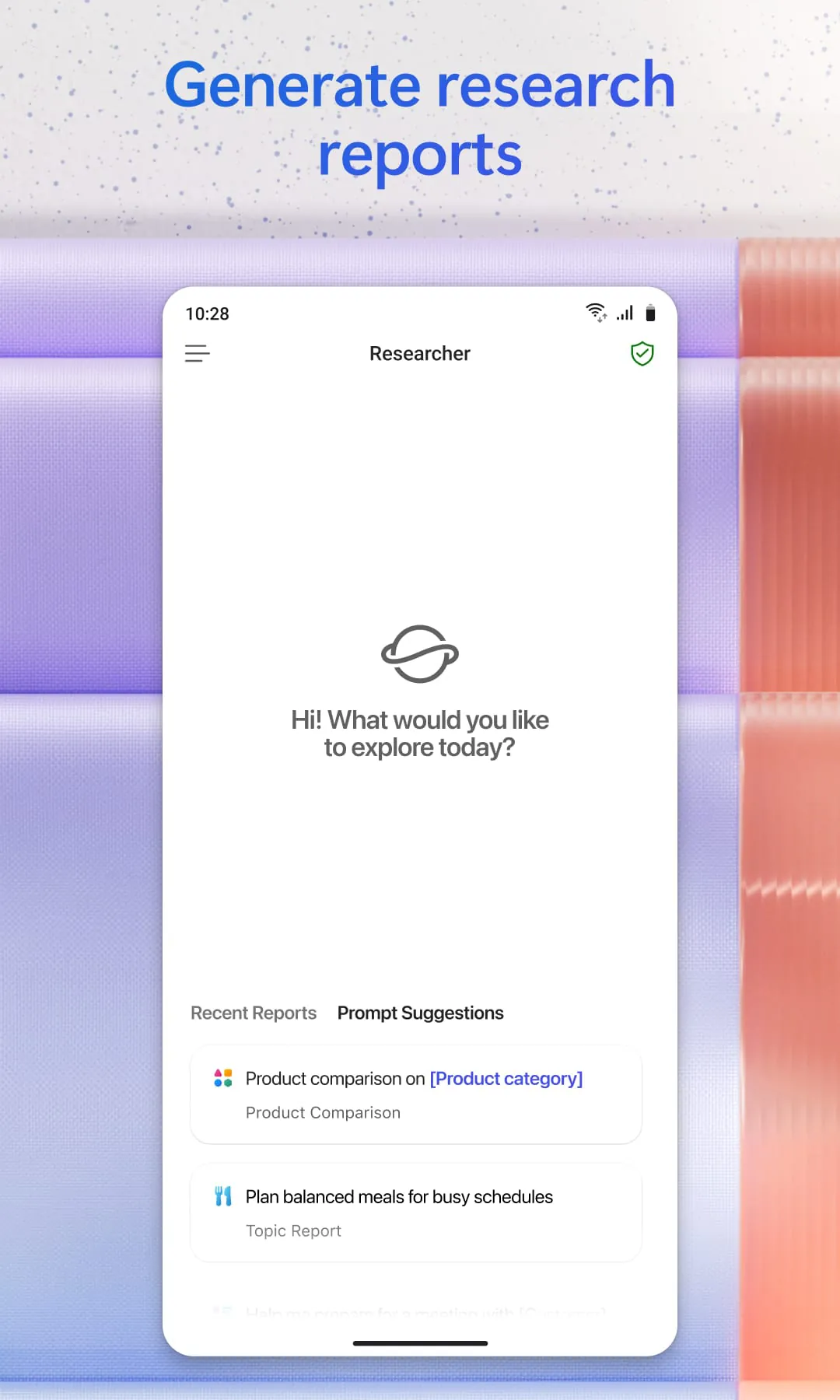
  • It also includes advanced tools like Copilot Pages (a collaborative canvas to refine AI-generated content with your team), the Agent Builder (to create specialized AI assistants for specific business tasks), and deep research capabilities to generate comprehensive reports.

Pros & Cons

Like any advanced tool, Microsoft 365 Copilot comes with distinct advantages and trade-offs that users should consider:

Pros:

  • Exceptional integration with the Microsoft ecosystem; it seamlessly connects your emails, files, calendar, and chats to provide highly contextual and relevant answers.
  • Significant time-saver for tedious tasks such as summarizing meetings, drafting routine emails, formatting Excel data, and overcoming the "blank page" problem in Word.
  • Enterprise-grade security and data privacy; it does not use your proprietary work data to train public AI models, and respects existing permission structures (you only see data you already have access to).
  • Cross-app functionality, such as drafting a Word document based on a PowerPoint outline, or creating a PowerPoint deck from a Word file, helps maintain consistency across materials.
  • The ability to build custom Agents and use Copilot Pages fosters teamwork and allows for the automation of niche business processes.

Cons:

  • High cost of entry, particularly for businesses, as it often requires specific licenses (e.g., $30 per user/month for the full enterprise version) and sometimes mandates annual commitments.
  • Occasional inaccuracies or "hallucinations," especially in Excel when dealing with complex nested formulas or poorly structured data, requiring users to heavily supervise and verify its output.
  • Inconsistent formatting in Word and PowerPoint; generated documents or slides often require manual tweaking to meet specific aesthetic or corporate standards.
  • A learning curve exists for prompting; while basic use is intuitive, mastering nuanced prompts to get exactly the desired result takes practice.
  • Heavy reliance on data being perfectly organized within the Microsoft 365 environment (e.g., data in Excel must be formatted as an official "Table" for Copilot to analyze it properly).

Functions

The core function of Microsoft 365 Copilot is to act as an intelligent co-pilot that augments human capability within the flow of work. Technically, it operates by combining a large language model (LLM) with the Microsoft Graph—a gateway to user-specific business data like documents, emails, calendar items, and contacts. When a user inputs a prompt (either typed or spoken), Copilot sends this request to the LLM, enriches it with relevant context retrieved securely from the Microsoft Graph, generates a response, and then presents it directly inside the application the user is working in (e.g., a sidebar in Word or Teams). Its functions span content generation (drafting text, code, or slides), content comprehension (summarizing meetings, emails, or long reports), data analysis (finding insights in Excel), task automation (creating Agents to handle repetitive jobs), and universal search (finding a file or piece of information across OneDrive, SharePoint, and emails using natural language). Essentially, it transforms static Microsoft 365 apps into dynamic, conversational, and proactive assistants that help users brainstorm, organize, analyze, and execute tasks faster.

How to Use

Click the button "Check All Versions" below to download and install it.

Once installed or accessed via the web, using Microsoft 365 Copilot is straightforward. If you are using the standalone Microsoft 365 Copilot app, simply sign in with your personal, work, or school Microsoft account. From the main interface, you can type or speak a prompt into the chat bar to ask questions, summarize a file (by uploading it or referencing a OneDrive/SharePoint link), or create content like images or lists. To use Copilot inside specific apps like Word or Excel, open the application and look for the Copilot icon (usually a sparkle or chat bubble) in the ribbon or toolbar. In Word, you can click this to open a sidebar where you can type "Draft a project proposal based on the file named 'Q3 Notes.docx'" and it will generate the text for you. In Excel, select your data table, click Copilot, and ask "Show me a bar chart of sales by region" or "What is the average profit margin?". In Teams, during or after a meeting, open the Copilot pane to select "Summarize" to get key takeaways and action items. For the best results, store your files in OneDrive or SharePoint so Copilot can access them, use clear and specific natural language prompts, and always review the AI-generated content for accuracy before finalizing your work.

ADVERTISEMENT

App Download

Get Microsoft 365 Copilot from an official store or available APK channel.

Available for Android & iOS

Previous Versions

ZIP files require a Split APKs Installer (e.g., SAI) from Google Play to install. Steps: 1. Download SAI from Google Play; 2. Open SAI and tap "Install APKs"; 3. Select the ZIP file; 4. Complete installation.

V16.0.19127.20172
Download
Package Name
com.microsoft.office.officehubrow
Version Name
V16.0.19127.20172
Version Code
V16.0.19127.20172
File Size
159.85 MB
Update time
2026-1-6
V16.0.17126.20102
Download
Package Name
com.microsoft.office.officehubrow
Version Name
V16.0.17126.20102
Version Code
V16.0.17126.20102
File Size
336.16 MB
Update time
2023-12-26
V16.0.16924.20140
Download
Package Name
com.microsoft.office.officehubrow
Version Name
V16.0.16924.20140
Version Code
V16.0.16924.20140
File Size
315.9 MB
Update time
2023-11-7
V16.0.16731.20136
Download
Package Name
com.microsoft.office.officehubrow
Version Name
V16.0.16731.20136
Version Code
V16.0.16731.20136
File Size
129.43 MB
Update time
2023-8-24
V16.0.16626.20136
Download
Package Name
com.microsoft.office.officehubrow
Version Name
V16.0.16626.20136
Version Code
V16.0.16626.20136
File Size
128.25 MB
Update time
2023-7-28
V16.0.16529.20174
Download
Package Name
com.microsoft.office.officehubrow
Version Name
V16.0.16529.20174
Version Code
V16.0.16529.20174
File Size
127.49 MB
Update time
2023-7-6
V16.0.16501.20200
Download
Package Name
com.microsoft.office.officehubrow
Version Name
V16.0.16501.20200
Version Code
V16.0.16501.20200
File Size
130.6 MB
Update time
2023-6-16
V16.0.16327.20270
Download
Package Name
com.microsoft.office.officehubrow
Version Name
V16.0.16327.20270
Version Code
V16.0.16327.20270
File Size
113 MB
Update time
2023-5-10
V16.0.16327.20282
Download
Package Name
com.microsoft.office.officehubrow
Version Name
V16.0.16327.20282
Version Code
V16.0.16327.20282
File Size
124.91 MB
Update time
2023-5-9
V16.0.15028.20124
Download
Package Name
com.microsoft.office.officehubrow
Version Name
V16.0.15028.20124
Version Code
V16.0.15028.20124
File Size
96.3 MB
Update time
2022-4-1
V16.0.14931.20106
Download
Package Name
com.microsoft.office.officehubrow
Version Name
V16.0.14931.20106
Version Code
V16.0.14931.20106
File Size
95.6 MB
Update time
2022-2-26
V16.0.14827.20124
Download
Package Name
com.microsoft.office.officehubrow
Version Name
V16.0.14827.20124
Version Code
V16.0.14827.20124
File Size
94.7 MB
Update time
2022-1-27
V16.0.14729.20176
Download
Package Name
com.microsoft.office.officehubrow
Version Name
V16.0.14729.20176
Version Code
V16.0.14729.20176
File Size
93.5 MB
Update time
2021-12-30
V16.0.14701.20166
Download
Package Name
com.microsoft.office.officehubrow
Version Name
V16.0.14701.20166
Version Code
V16.0.14701.20166
File Size
91.8 MB
Update time
2021-11-25
ADVERTISEMENT

Frequently Asked Questions

What is the latest version of Microsoft 365 Copilot?

The latest version currently listed by Appspicked is V16.0.17126.20102, with information updated on May 22, 2026. Versions may vary by device, region, or rollout schedule, so users should also check Google Play / App Store or announcements from Microsoft Corporation.

Is Microsoft 365 Copilot safe to download and use?

No website can guarantee that an app is completely risk-free. Appspicked recommends downloading Microsoft 365 Copilot only from an official app store or a verified channel operated by Microsoft Corporation. Before installing, confirm the developer name, package ID com.microsoft.office.officehubrow, requested permissions, privacy policy, and download source.

Why can’t I find Microsoft 365 Copilot in the App Store?

Microsoft 365 Copilot may be unavailable because of regional restrictions, device incompatibility, account or age settings, a temporary removal, a name change, or because it has not been released for that platform. An Android package page does not necessarily mean that an iOS App Store version exists. Check Microsoft Corporation’s official website for current availability.

Where can I download or update Microsoft 365 Copilot?

Use Google Play / App Store or another official download channel provided by Microsoft Corporation whenever possible. Appspicked provides app information and store links, but users should verify the destination domain and publisher before downloading or updating the app.

Why is the version shown on Appspicked different from the app-store version?

The information on Appspicked may represent the most recently indexed snapshot. App stores sometimes release updates gradually or display different versions according to region, device, operating system, or testing group. The official store listing should be treated as the final reference.

Which devices and operating systems support Microsoft 365 Copilot?

Microsoft 365 Copilot is listed for Android / iOS, with a reported minimum requirement of Not specified. Actual compatibility may also depend on the device model, region, available storage, hardware features, and installed system components.

Is Microsoft 365 Copilot free?

The initial download may be free, but subscriptions, advertising, paid features, or in-app purchases may still apply. Prices and available purchases can vary by country and version. Check the payment information displayed by Google Play / App Store before completing a transaction.

What should I do if Microsoft 365 Copilot cannot be installed or updated?

Check the network connection, storage space, operating-system version, account region, and device compatibility. Restart the device and try again through the official store. If the problem continues, consult the support resources provided by Microsoft Corporation.


ADVERTISEMENT
You Might Like