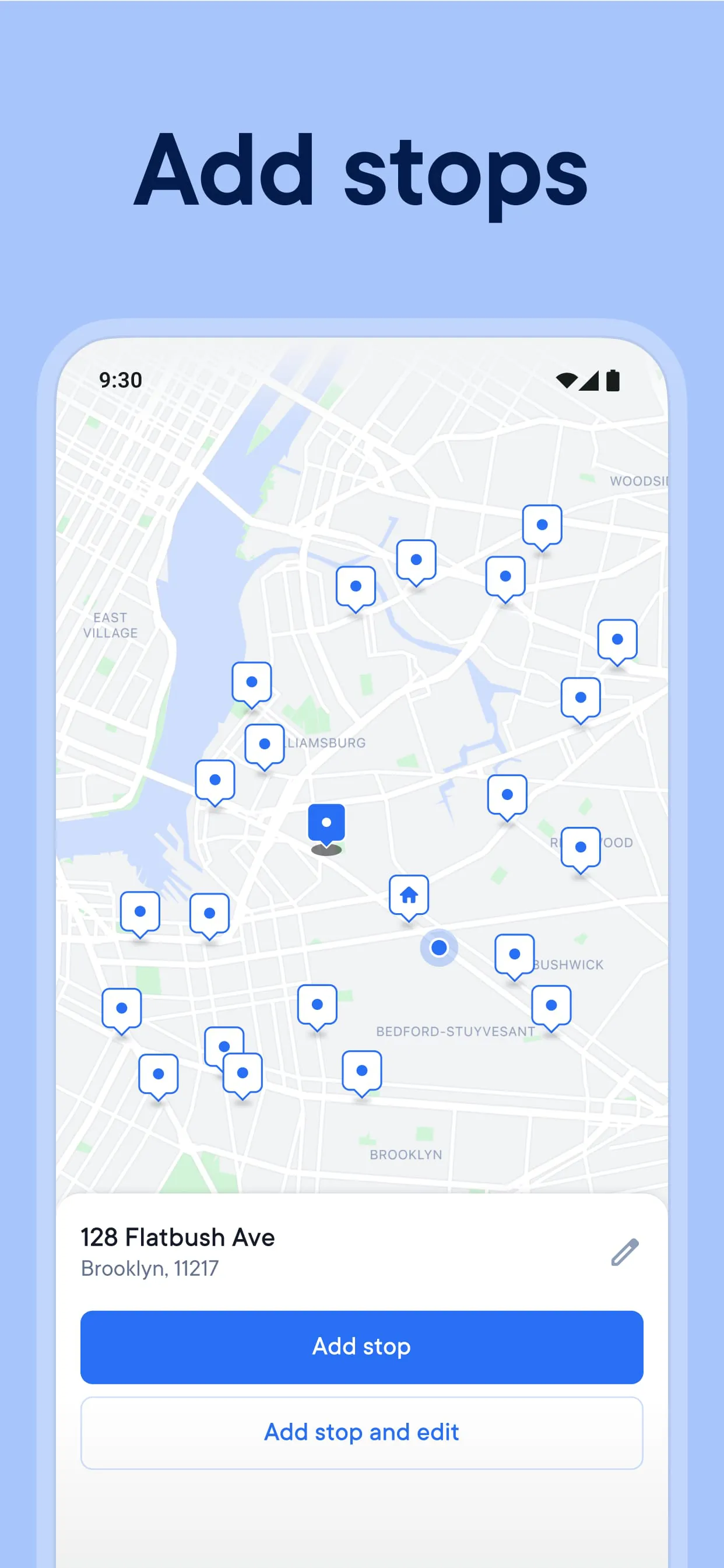
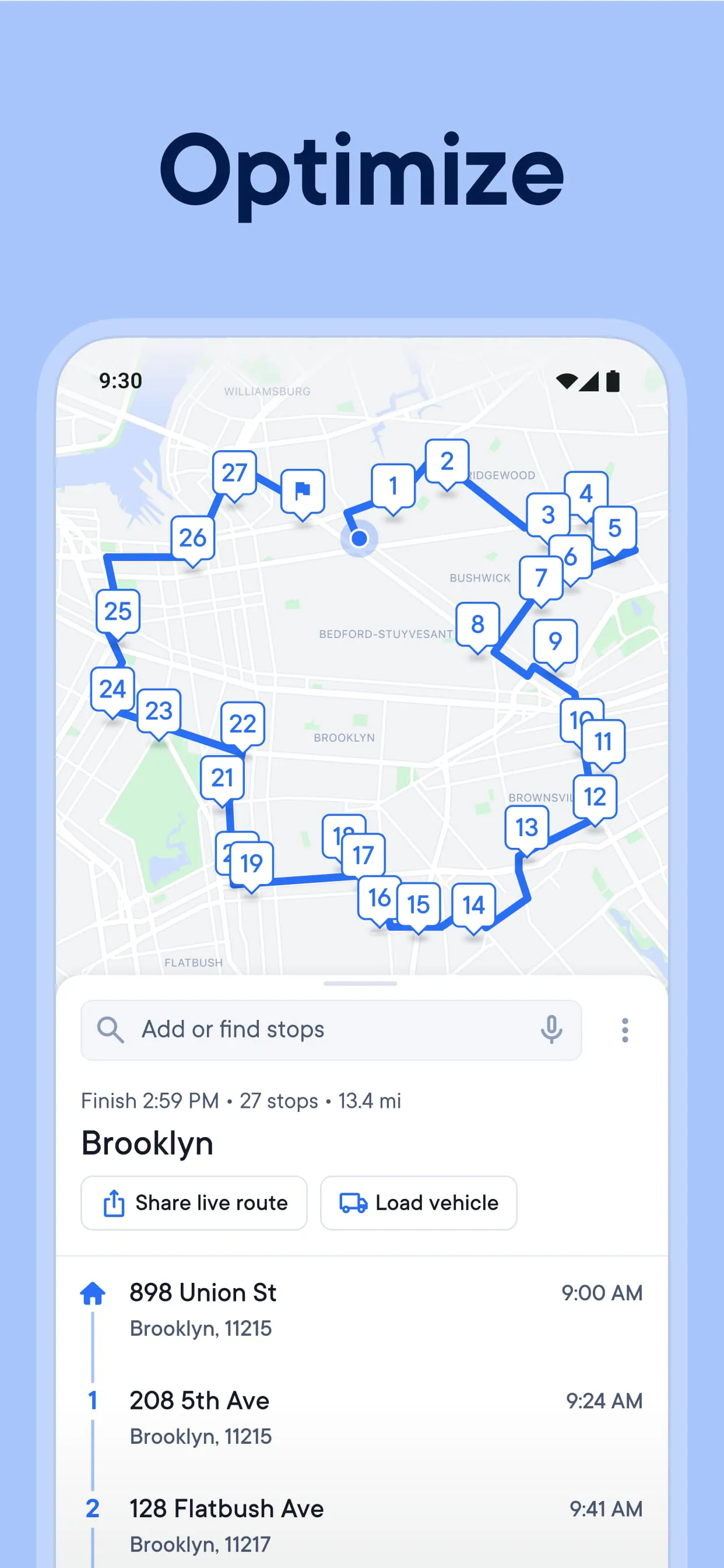
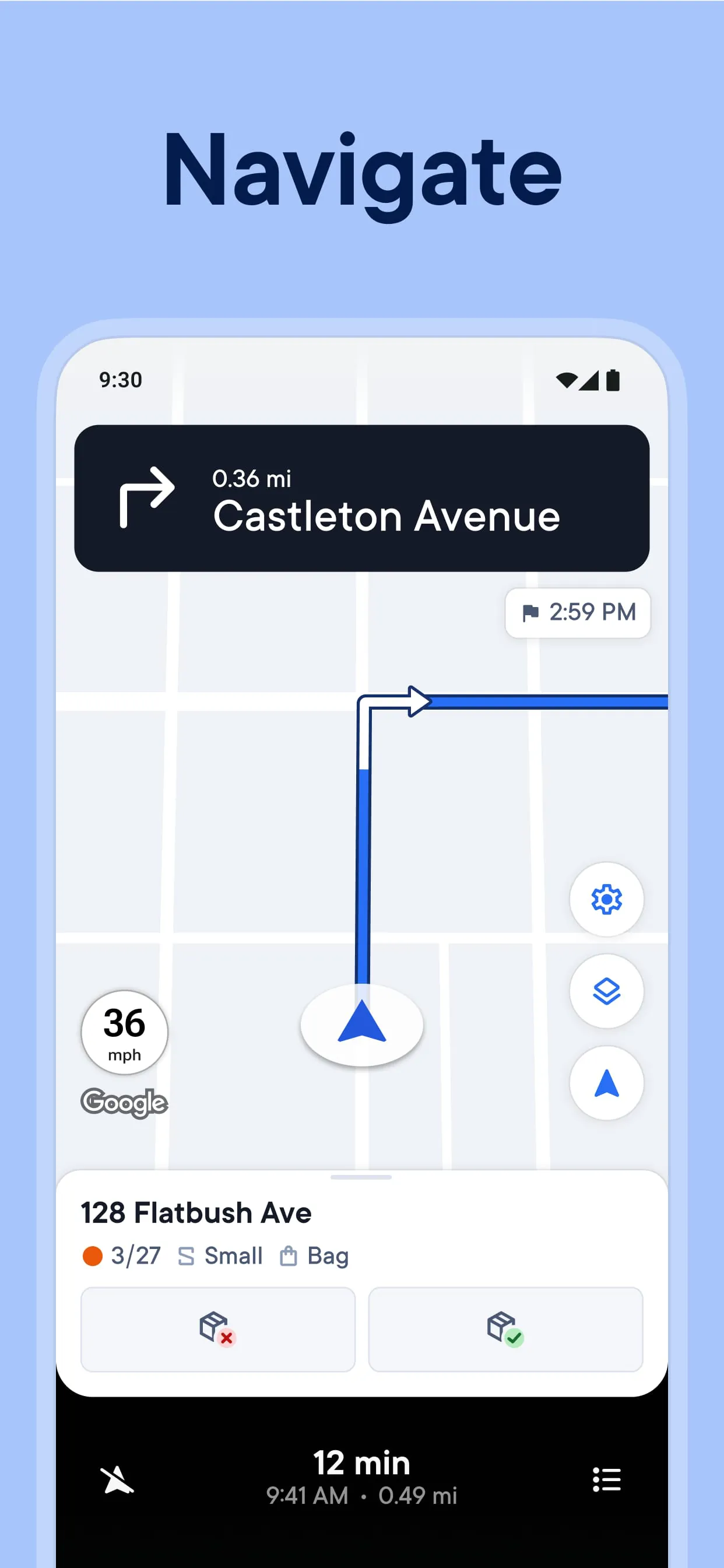
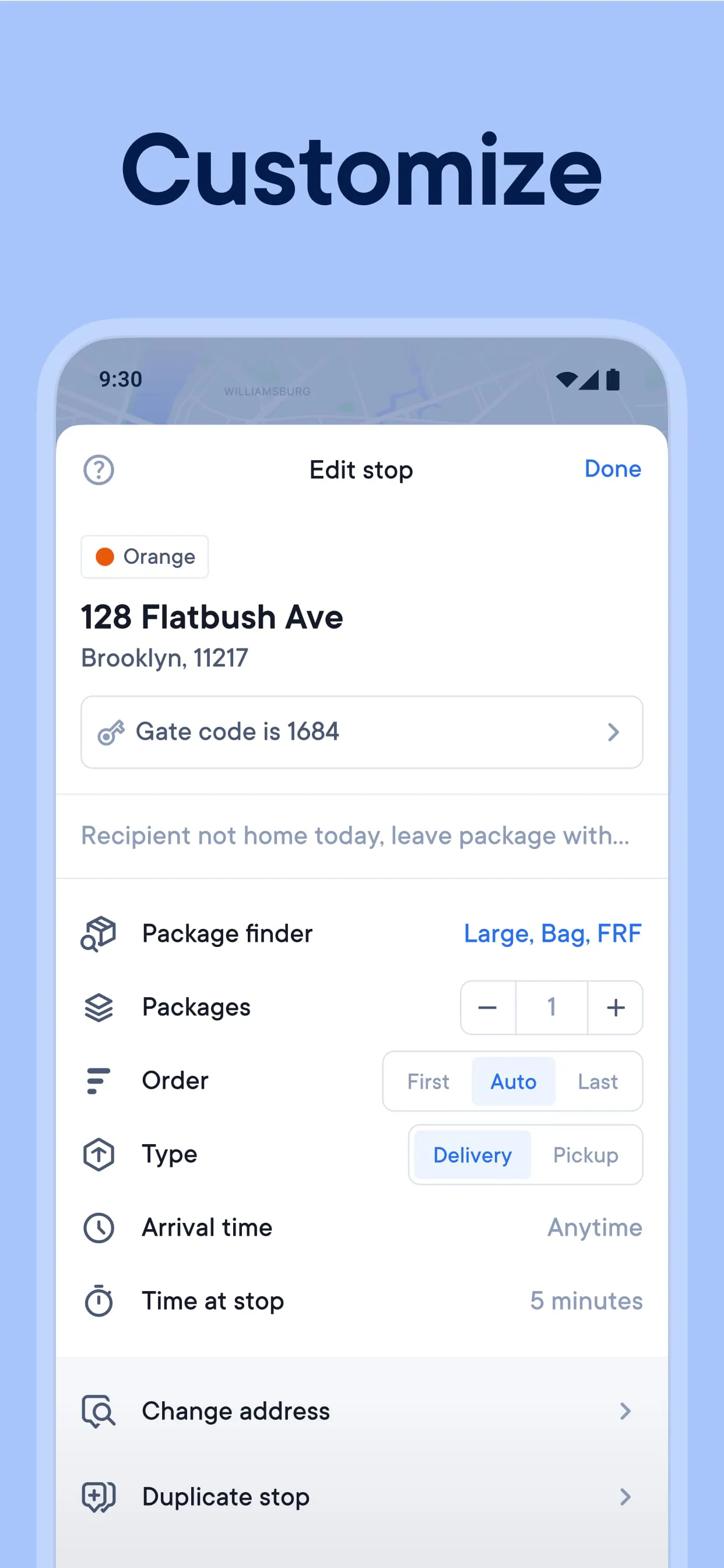
The Spoke Route Planner, formerly known as Circuit Route Planner, is presented as a user-friendly multi-stop route planning and delivery application designed to assist drivers in optimizing their routes and improving delivery efficiency. Marketed towards a vast user base of over 10 million drivers, the app emphasizes its ability to save time, money, and fuel by enabling faster and more efficient delivery routes. The core functionality revolves around swiftly adding multiple stops to a route and optimizing the sequence of these stops with a single click, thereby automatically planning the shortest and most efficient route. This optimization aims to help drivers avoid traffic congestion, locate packages more quickly, and ultimately deliver more efficiently. The application's features extend to various methods of adding stops, including keypad input, voice commands, and spreadsheet uploads, catering to different user preferences and workflows. It boasts the capacity to handle an unlimited number of deliveries and routes per day, making it suitable for high-volume delivery operations. The route planner automatically calculates the most efficient route while considering real-time traffic conditions to avoid congestion and delays. It also allows for on-the-fly route modifications to accommodate unexpected changes or urgent deliveries. The ability to manually adjust the order of stops within a route provides additional flexibility for drivers who may need to prioritize certain deliveries or adapt to specific circumstances. Furthermore, the Spoke Route Planner integrates seamlessly with popular GPS navigation apps such as Waze and Google Maps, allowing drivers to use their preferred navigation tools while benefiting from the route optimization features of the app. Users can set delivery time windows and priority levels for each stop, ensuring that time-sensitive deliveries are prioritized and that deliveries are made within specified timeframes. The app also enables customization of the time spent at each stop and the inclusion of break times, allowing drivers to create realistic and sustainable schedules. Accurate estimated times of arrival (ETAs) are calculated quickly, providing drivers and customers with reliable delivery time predictions. The ability to add package details facilitates easier loading and locating of packages, streamlining the delivery process and reducing the risk of errors. The Spoke Route Planner is positioned as a comprehensive solution for delivery drivers seeking to improve their efficiency, reduce costs, and enhance their overall delivery operations. Its widespread adoption in over 190 countries underscores its global applicability and its potential to address the challenges faced by delivery drivers worldwide. The app's focus on user-friendliness, flexibility, and integration with existing tools makes it an attractive option for drivers of all levels of experience.
The application offers different subscription tiers to cater to varying user needs and usage levels. The free version of Spoke Route Planner provides unlimited access to all features but limits the number of stops that can be added to a route to 10. This option is suitable for drivers with relatively simple delivery routes or those who want to test the app's functionality before committing to a paid subscription. The Spoke Route Planner Lite version offers unlimited routes and stops but restricts access to certain features. This tier is designed for users who require the ability to plan complex routes with numerous stops but do not need all the advanced features offered in the standard version. The Spoke Route Planner Standard version provides unlimited access to all features without any restrictions on the number of routes or stops. This is the most comprehensive option, suitable for professional delivery drivers and businesses with high-volume delivery operations. The app claims that most multi-drop delivery operators save an average of approximately 10 hours per week by using the Spoke Route Planner. This time savings is attributed to the app's ability to optimize routes, reduce mileage, and minimize delays. The availability of a 14-day trial allows potential users to experience the full benefits of the app before committing to a subscription. This trial period provides an opportunity to assess the app's suitability for individual needs and to determine which subscription tier is the most appropriate. The app emphasizes its ability to help drivers deliver more, faster, and more easily, highlighting its potential to increase productivity and profitability. The application addresses common user questions in a FAQ section, providing information on its availability in different countries, language support, route creation limits, stop addition limits, and subscription management. The Spoke Route Planner uses location data provided by Google Maps, making it available in virtually every country where Google Maps is supported. The app automatically detects the user's smartphone language and uses it if available. If the language is not supported, the app defaults to U.S. English. Both free and paid versions of the app allow for the creation of an unlimited number of routes. The free version limits the number of stops per route to 10, while the paid versions offer unlimited stops. Subscriptions are automatically renewed monthly and charged to the user's Google Play account. Users can cancel their subscriptions at any time through their Google Play account settings. Pricing varies by country and is displayed before payment. The app provides links to support resources, product updates, terms of service, and privacy policy, ensuring that users have access to the information they need to use the app effectively and safely.
The testimonial from a driver named Nathan from Canada highlights the practical benefits of using the Spoke Route Planner in real-world delivery scenarios. Nathan, who delivers around 150 packages per day, states that the app helps him find the shortest routes, allowing him to deliver more packages in less time. He also notes that he has increased his income and saves approximately one hour per day by using Spoke. Nathan describes the app as the best he has ever used, underscoring its effectiveness and user-friendliness. The application's ability to integrate with existing GPS navigation tools such as Waze and Google Maps is a significant advantage, as it allows drivers to continue using their preferred navigation apps while benefiting from the route optimization features of Spoke. This integration minimizes the learning curve and makes it easier for drivers to adopt the new tool into their existing workflows. The app's features for setting delivery time windows and priority levels ensure that time-sensitive deliveries are prioritized and that deliveries are made within specified timeframes. This is particularly important for businesses that offer time-definite delivery services or that need to meet specific customer requirements. The ability to customize the time spent at each stop and to include break times allows drivers to create realistic and sustainable schedules. This helps to prevent burnout and ensures that drivers are able to maintain a high level of productivity throughout the day. The accurate ETAs provided by the app help to manage customer expectations and to improve overall customer satisfaction. The ability to add package details facilitates easier loading and locating of packages, streamlining the delivery process and reducing the risk of errors. This is especially beneficial for drivers who handle a large volume of packages each day. The Spoke Route Planner is positioned as a valuable tool for delivery drivers seeking to improve their efficiency, reduce costs, and enhance their overall delivery operations. Its widespread adoption in over 190 countries underscores its global applicability and its potential to address the challenges faced by delivery drivers worldwide. The app's focus on user-friendliness, flexibility, and integration with existing tools makes it an attractive option for drivers of all levels of experience, contributing to its positive reception and high user ratings.